How to set Language Preferences
Question
Is it possible to change the language preferences?
Answer
In Digital Hive, administrators can set a default language for users, and individuals can also update their preferred language in their profile settings.
Steps for an administrator to set the default language
- Launch Digital Hive
- Click your avatar (initials on the top right)
- Select Manage Digital Hive
- Click Customizations
- You will see a Default user language section. Under Preferred Language, click the drop-down list and select the default user language that you would like to set.
In this example, the language that users will see by default is English (Canada) unless they modify their preferred language in their profile settings.
Steps for an individual to update their preferred language
- Launch Digital Hive
- Click your avatar (initials on the top right)
- Click My Account
- Beside Preferred Language, click the edit icon (pencil)
- Click the dropdown and select your preferred language
- Click the checkmark
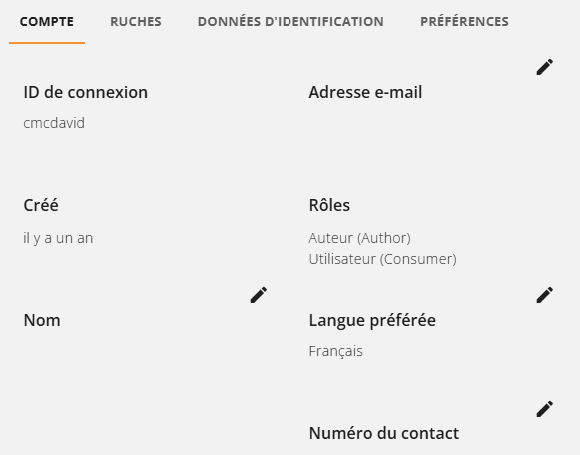
In this example, French was selected and you can now see that the language has been set to French for that individual:
Related Articles
What's New in the 2024.3 Digital Hive Release
This articles details the new product features, enhancements, and resolved issues, that were included as part of the Digital Hive 2024.3 release. New Features & Enhancements Upgraded versions of PostgreSQL and ElasticSearch This release of Digital ...How to set up Multilingual Pages in Digital Hive 2026.1?
Question How do I configure multilingual pages in Digital Hive version 2026.1? Answer Multilingual support is now handled on a per page basis by adding different locales. Create a new Hive or add a new page to an existing Hive. You can add certain ...Set a Custom Thumbnail for Content
Question Not all of my content has an automatically generated thumbnail but I would like to have a thumbnail appear for a specific report. Is it possible to configure a thumbnail for a specific piece of content? Answer Yes, as of the Digital Hive 2.1 ...What's New in the 2025.1 Digital Hive Release
What's New in the Digital Hive 2025.1 Release This articles details the new product features, enhancements, and resolved issues, that were included as part of the Digital Hive 2025.1 release. Prerequisites To move to this release, this must be a new ...Digital Hive Frequently Asked Questions (FAQ)
Installation Can Digital Hive be installed on premise or in the Cloud? Digital Hive can be installed using either on-premise hardware, in a Private Cloud, or a hybrid architecture that leverages both Cloud and on-premise. There is currently no ...